

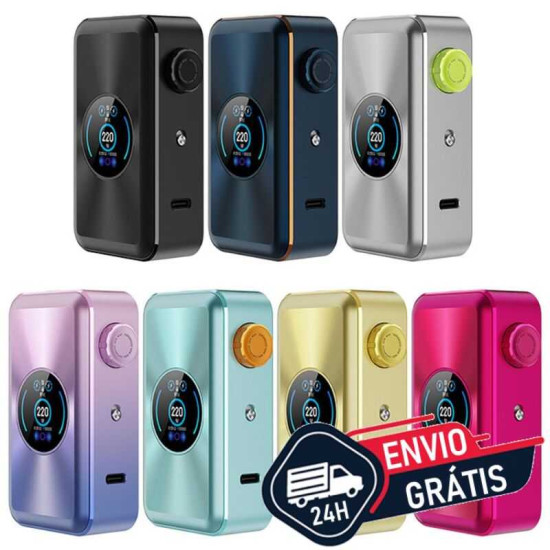


The Vaporesso Gen Max Mod is a high-powered vapor device. high power. Powered by two
18650 batteries
(not included) and with a power output that can reach up to 220 W. With a large color screen TFT de 0,96 inches. Powered by the AXON CHIP, the GEN MOD offers a variety of modes for a professional vaping experience. The standard mode Pulse standard ensures stable output, providing consistent flavour and high quality from the first to the last draw.
Features:
- Brand: Vaporesso
-
Dimensions:
88 x 49.7 x 28.5 mm.
-
Battery Compatibility: Uses two 18650 batteries (not included).
Click here to purchase batteries for this Box Mod.
- Output Power: 5-220w.
- Charging Current: DC 5 V / 2 A, Type C.
-
Screen: 0.96" TFT.
Benefits:
-
Superior Power:
With a capacity of up to 220W, the GEN MAX MOD offers exceptional power for a personalized and intense vaping experience.
-
Advanced Technology:
Equipped with the latest technology from Vaporesso, ensuring reliable performance and efficiency in vaping.
-
Modern and Stylish Design:
The sophisticated design not only provides an attractive look but also enhances ergonomics and comfort during use.
-
Precision Control : Allows fine adjustments and precise control of vaping settings, adapting to your personal preferences.
- Versatile Compatibility: Compatible with a wide range of atomizers and accessories, offering flexibility and customization for different vaping styles.
- Robust Construction: Made with durable materials that ensure longevity and resilience, ideal for daily use.
- Ease of Use: Intuitive and easy-to-navigate interface, making it simple to adjust settings and customize your vaping experience.
-
Fast Charging: Equipped with fast charging technology so you can spend more time enjoying your vape and less time waiting.
-
Advanced Safety: Includes multiple protection features, such as short-circuit and overcharge protection, for safe and reliable use.
- Consistent Performance: Delivers a consistent vaping experience, with dense and flavorful vapor every time.
Safety and Care:
- Proper Battery Handling: Ensure you use appropriate battery chargers to recharge the device's batteries. Avoid exposing the battery to high temperatures or physical damage that could compromise its integrity.
-
Proper Storage: When not in use, store the batteries in a cool, dry place away from heat sources or direct sunlight. Avoid storing the battery in contact with metallic objects that could cause a short circuit,
by properly storing them in suitable boxes or cases..
-
Regular Cleaning:
Regularly clean the device, especially the cartridge and battery contact area, to ensure proper functioning and prevent the buildup of residue that could affect vapor quality.
- Troubleshooting: Be alert to any signs of malfunction, such as leaks, overheating, or strange tastes while vaping. Stop using the device immediately if you detect any issues and get in touch with customer support for assistance. for assistance.
- Vaping requires knowledge, care, and attention to safety. For a more comprehensive understanding of vaping and how to use our products with responsibility for a pleasant and safe experience, consult the FAQ (Frequently Asked Questions) of Contraste Vaping® available here.
Usage Instructions:
-
Initial Preparation:
Unpack the device and all accessories that come with the MOD GEN MAX 220W. Inspect the device and batteries to ensure there are no visible damages.
- Inserting the Batteries: Slide the battery compartment cover at the bottom of the device. Insert the batteries into the compartment following the correct orientation of the positive (+) and negative (-) terminals indicated inside the compartment. Close the cover and make sure it is securely fastened.
- Turning the Device On and Off: To turn on the device, press the fire button 5 times quickly. The device will display a startup screen. To turn off the device, press the fire button 5 times again. The screen will go dark, indicating that the device is off.
- Adjusting the Settings: Press the fire button and the adjustment button (+) or (-) simultaneously to access the settings menu. Use the adjustment buttons (+) and (-) to navigate through the menu options, such as wattage (W), operating mode (VW, TC, etc.), and other settings. Select the desired setting and confirm your choice by pressing the fire button.
- Preparing the Atomizer: Connect the atomizer to the device, ensuring that the threading is securely tightened. Check that there is enough liquid in the atomizer and that the cotton is well saturated before you start using it.
- Firing the Device: Press and hold the fire button while inhaling through the atomizer's tip. Release the fire button when you finish inhaling.