

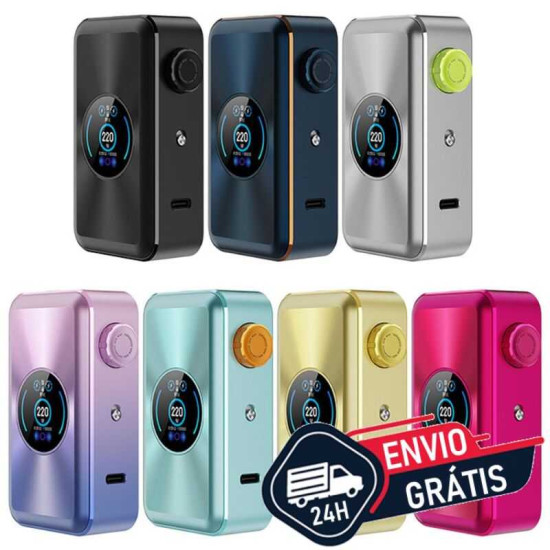


The Vaporesso Gen Max Mod is a high-powered vapor device. high power. Powered by two
18650 batteries
(not included) and with a power that can reach up to 220 W. With a large color screen TFT de 0,96 inches. Powered by the AXON CHIP, the GEN MOD offers a variety of modes for a professional vaping experience. The standard mode Pulse ensures stable output, ensuring consistent flavour and of high quality from the first to the last puff.
Features:
- Brand: Vaporesso
-
Dimensions:
88 x 49.7 x 28.5 mm.
-
Battery Compatibility: Uses two 18650 batteries (not included).
Click here to purchase batteries for this Box Mod.
- Output Power: 5-220w.
- Charging Current: DC 5 V / 2 A, Type C.
-
Screen: 0.96" TFT.
Benefits:
-
Higher Power:
With up to 220W, the MOD GEN MAX offers exceptional power for a personalized and intense vaping experience.
-
Advanced Technology:
Equipped with Vaporesso's latest technology, ensuring reliable performance and vaporization efficiency.
-
Modern and Sleek Design:
The sophisticated design not only provides an attractive appearance, but also enhances ergonomics and comfort during use.
-
Precision Control
: Allows fine adjustments and precise control of vaping settings, adapting to your personal preferences.
- Versatile Compatibility: Compatible with a wide range of atomizers and accessories, offering flexibility and customization for different vaping styles.
- Robust Construction: Made with durable materials that ensure longevity and resilience, ideal for daily use.
- Ease of Use: Intuitive and easy-to-navigate interface, simplifying the adjustment of settings and personalization of the vaping experience.
-
Fast Charging: Equipped with fast charging technology so you can spend more time enjoying your vape and less time waiting.
-
Advanced Safety: Includes multiple protection features, such as short-circuit and overcharge protection, for safe and reliable use.
- Consistent Performance: Delivers a consistent vaping experience, with dense and flavorful vapor with every use.
Safety and Care:
- Proper Battery Handling: Ensure you use appropriate battery chargers to recharge the device's batteries. Avoid exposing the battery to high temperatures or physical damage that could compromise its integrity.
-
Proper Storage: When not in use, store the batteries in a cool, dry place away from heat sources or direct sunlight. Avoid storing the battery in contact with metallic objects that could cause a short circuit,
storing them properly in suitable cases or sleeves.
-
Regular Cleaning:
Clean the device regularly, especially the cartridge and the battery contact area, to ensure proper operation and prevent residue buildup that could affect vapor quality.
- Problem Identification: Be alert for any signs of malfunction, such as leaks, overheating, or odd taste when vaping. Stop use immediately if you detect any issue and contact customer support for assistance.
- Vaping requires knowledge, care, and safety awareness. For a comprehensive understanding of vaping and how to use our products with responsibility for a pleasant and safe experience experience, consult the FAQ (Frequently Asked Questions) da Contraste Vaping® available here.
Usage Instructions:
-
Initial Preparation: Unpack the device and all accessories that accompany the MOD GEN MAX 220W. Inspect the device and batteries to ensure there are no visible damages.
- Battery Insertion: Slide the battery compartment cover on the bottom of the device. Insert the batteries into the compartment following the correct polarity orientation (+) and (-) indicated inside the compartment. Close the cover and make sure it is firmly closed.
- Powering On and Off the Device: To turn the device on, press the fire button 5 times quickly. The device will display a boot screen. To turn the device off, press the fire button 5 times again. The screen will turn off, indicating the device is off.
- Adjusting Settings: Press the fire button and the adjustment button (+) or (-) simultaneously to access the settings menu. Use the adjustment buttons (+) and (-) to navigate through the menu options, such as power (W), operating mode (VW, TC, etc.), and other settings. Select the desired setting and confirm the choice by pressing the fire button.
- Prepare the Tank: Attach the atomizer to the device, ensuring the connection is snug. Check that there is enough liquid in the atomizer and that the cotton is well saturated before starting to use.
- Firing the Device: Press and hold the fire button while inhaling through the tip of the atomizer. Release the fire button when you finish inhaling.